 AstroGeo
How it works
Three steps to a map that is only yours.
The lines are computed from your birth date, time and place, so two people looking at the same city see different maps.
Your birth data
Date, time and place, entered once. Everything the app draws is measured against that chart.
Choose the topics
Twelve of them, from a holiday to health recovery. Pick two and the map redraws for those.
Pick a period
Your whole life, one year, or a single date. Search for a city, or read the map directly.
Straight from the app
Four screens, in order.
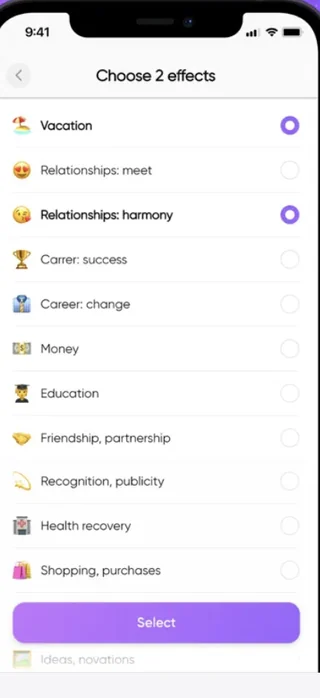
Choose the effects
Twelve topics, two selected at a time.
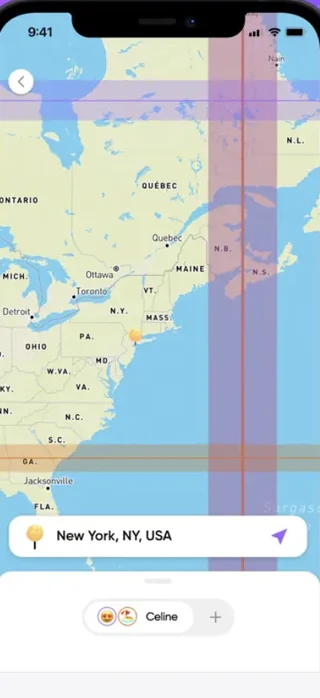
Lines on the map
Bands over the map, with a city search.
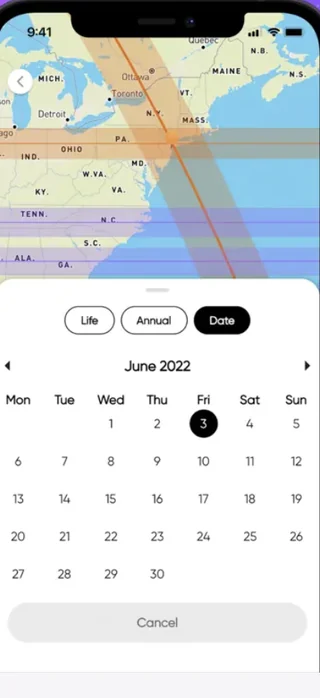
Life, year or a date
Three modes and a calendar.
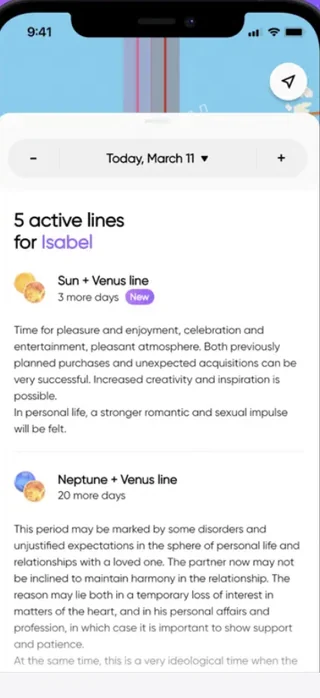
Read the lines
What is active, for how long, and what it means.
Topics
Twelve things you might want from a place.
These are the effects the app maps. Two at a time, so the picture stays readable.
More than one chart
Your people, on the same map.
Profiles you add
Add family, a partner or a friend and see the same topics on their map, not only yours. Their birth details are entered by you, so add someone only if they know and agree.
Active lines, in words
For any profile and any date the app lists the lines that are running — which planets, how many days are left, and what that combination traditionally means.
What this app is, and what it is not
AstroGeo is an astro-geographical tool for reflection and travel planning. It does not provide medical, psychological, legal or financial advice, and nothing in it replaces a professional. The lines are computed from astronomical positions, but their meanings are traditional astrological readings — not statements of fact about what will happen in a given place.
Subscription
What you pay, and how to stop paying.
AstroGeo is free to download. Full access is sold as auto-renewable subscriptions through your Apple Account.
Full conditions are in the Terms of Use. What data is involved is in the Privacy Policy.
Common questions
Before you start.
Do I need my exact birth time?
The closer the better. The lines are tied to the moment and the place of birth, so an hour of difference shifts them across the map. If you are unsure of the time, treat the result as approximate.
Why does the app ask for my location?
To centre the map where you are and to show which lines fall on your current position. You can decline the permission and search for cities by name instead — everything else keeps working. What is done with location data is set out in the Privacy Policy.
Does it predict what will happen if I move there?
No. It shows where a given influence falls according to astro-geographical tradition, and explains what that influence is usually taken to mean. It is not a forecast of fact, and it is not advice about health, money or legal matters.
Can I add someone else's chart?
Yes — that is what profiles are for. You are entering another person's birth details, so add someone only if they know and agree.
How do I delete my account and my data?
In the app, in your account settings, or by writing to privacy@astrogeo.app. That removes your chart and the profiles you added. Deleting the account does not cancel a subscription — that is done in your Apple Account.
More answers, and a person who replies, on the support page.
Find out which places are yours.
Free to download. Enter your birth data once and the map is yours from then on.